Why You Can Trust This Review
Choosing a dash camera isn't just about recording accidents. A good dash cam should be reliable, easy to install, produce clear footage in different lighting conditions, and remain unobtrusive during daily driving.
For this review, we evaluated Fitcamx based on:
- Official product specifications and installation guides.
- Independent reviews from automotive publications.
- Public customer feedback, including positive and critical experiences.
Rather than focusing on marketing claims alone, this review aims to provide a balanced assessment of where Fitcamx excels and where potential buyers should set realistic expectations.
What Is Fitcamx?
Unlike traditional dash cameras that attach to the windshield with suction cups or adhesive mounts, Fitcamx takes a completely different approach.
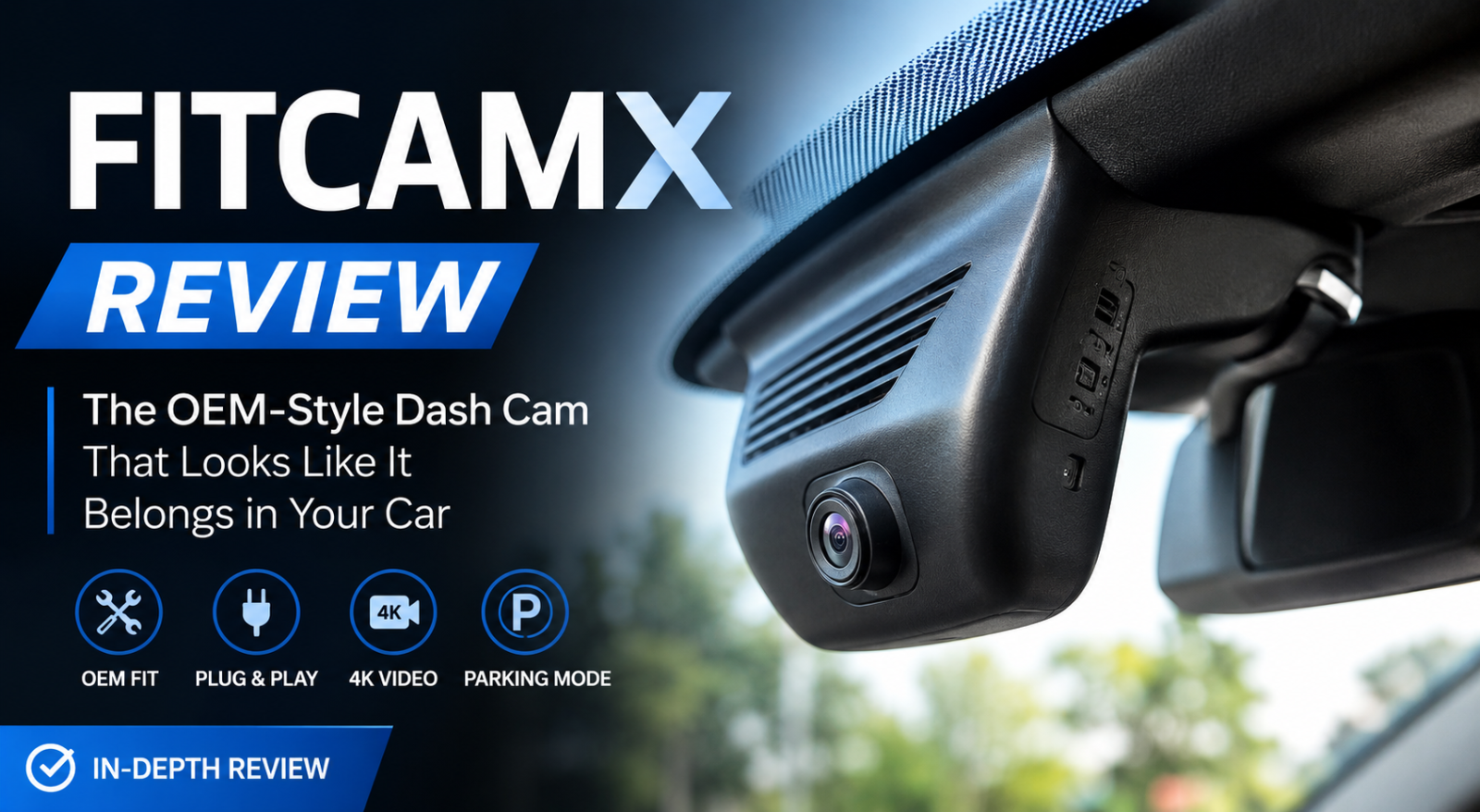
Instead of adding another device to your dashboard, Fitcamx replaces the factory plastic housing behind the rearview mirror with a custom-designed enclosure that integrates the camera into your vehicle. Once installed, it closely resembles an original factory component, making it one of the cleanest-looking dash cam solutions currently available.
The company manufactures model-specific versions for many popular brands, including:
- Toyota
- Honda
- Lexus
- BMW
- Audi
- Tesla
- Mercedes-Benz
- Volvo
- Ford
- Hyundai
- Kia
- Subaru
- Volkswagen
This vehicle-specific approach is one of Fitcamx's biggest advantages over universal dash cameras.
First Impressions
One thing becomes immediately clear when browsing the Fitcamx website: the company is focused on integration rather than adding flashy features.
Instead of promoting oversized touchscreens or voice assistants, Fitcamx highlights:
- Plug-and-play installation
- Hidden wiring
- OEM appearance
- Factory-style fitment
That positioning makes sense because many drivers simply don't like the appearance of conventional dash cameras hanging below the mirror.
The clean installation is arguably Fitcamx's biggest selling point.
Installation Experience
Installation is where Fitcamx separates itself from most competitors.
Traditional dash cams often require routing cables along the windshield, behind the A-pillar, and sometimes into the fuse box.
Fitcamx avoids much of this complexity.
For many compatible vehicles, the camera draws power directly from the existing rain sensor or mirror assembly using a plug-and-play harness, eliminating the need for exposed wiring across the dashboard.
Most owners report installation times ranging from 15 to 30 minutes, depending on the vehicle model. Independent reviewers also praise how seamlessly the replacement housing matches the original trim, making the camera almost invisible once installed.
However, it's worth noting that installation isn't identical for every vehicle. Some models may require extra care when removing interior trim, and optional parking mode can involve additional wiring to the fuse box.
Design & Build Quality
If design alone determined the winner, Fitcamx would be difficult to beat.
Unlike bulky dash cams with large screens, suction mounts, and dangling power cables, Fitcamx is engineered to blend into the vehicle's interior.
From outside the car, many people won't even realize a dash camera is installed.
This OEM-inspired design offers several practical benefits:
- Less windshield clutter
- No blocked field of view
- Reduced temptation for theft
- Cleaner cabin appearance
The replacement housing is designed to closely match the original mirror cover in both texture and color for supported vehicles.
For drivers who care about preserving the factory look of their car, this alone may justify choosing Fitcamx over a conventional dash cam.
Video Quality
Fitcamx advertises up to 4K front recording, paired with a wide-angle lens and an f/1.6 aperture on many models. Features such as WDR, loop recording, Wi-Fi connectivity, G-sensor, and optional rear-camera configurations are also available depending on the version.
In daylight, reviews generally describe the footage as clear and detailed enough for routine driving, with good color reproduction and a wide field of view.
Night performance receives more mixed feedback. Some reviewers found the camera acceptable for general recording, while others reported that moving license plates and distant details can become harder to read due to image processing and motion blur, especially compared with some dedicated premium dash cams.
This doesn't necessarily make Fitcamx a poor camera—it simply highlights that its primary strength is OEM integration, while absolute image quality may not always match the very best standalone dash cams in every scenario.
Mobile App Experience
One of the biggest differences between modern dash cams is no longer the camera itself—it's the companion app.
Since most newer dash cams have removed built-in displays in favor of smartphone connectivity, the mobile app plays a major role in the overall ownership experience.
Fitcamx uses its own dedicated mobile application, available for both Android and iOS, allowing users to connect directly to the camera through Wi-Fi. Once connected, you can:
- Watch live footage
- Download video clips
- Change recording settings
- Format the memory card
- Capture snapshots
- Share recordings directly from your phone
The interface is relatively simple and doesn't overwhelm first-time users with dozens of technical settings. Most essential functions are only a few taps away, making it approachable for drivers who simply want to review footage after an incident. The official app supports Wi-Fi connection, camera settings, video download, editing, and sharing.
That said, the experience isn't perfect.
Compared with premium brands like Garmin, Thinkware, or Viofo, Fitcamx's app feels more functional than polished. File transfers over 2.4 GHz Wi-Fi are adequate for occasional use but noticeably slower than newer dash cams offering dual-band Wi-Fi 6. Users who frequently download large 4K video files may find the transfer speed less convenient. Comparisons with newer Viofo models also highlight the advantage of faster wireless connectivity and more extensive app controls.
For occasional access to recordings, however, the app performs its job well and is unlikely to be a deal-breaker for most owners.
Parking Mode
Parking surveillance has become one of the most requested features in modern dash cams, particularly for drivers who regularly leave their vehicles in public parking lots or on city streets.
Fitcamx supports parking mode, but there's an important distinction that buyers should understand.
The standard plug-and-play installation records while the vehicle is powered on. If you want the camera to continue monitoring while parked, you'll generally need an additional power solution, such as an OBD cable or hardwire kit, depending on your vehicle and the specific Fitcamx model.
Once properly configured, parking mode can:
- Detect impacts
- Save emergency recordings
- Monitor the vehicle when unattended
- Protect important footage from being overwritten
Compared with premium competitors, Fitcamx's parking mode is relatively basic. Cameras like the Viofo A229 series offer buffered parking recording, capturing several seconds before an event occurs, as well as more flexible voltage cutoff options to better protect the vehicle's battery.
For many everyday drivers, Fitcamx's implementation will still be sufficient, but buyers who prioritize advanced parking surveillance may prefer a more feature-rich alternative.
Daily Driving Performance
A dash cam isn't just judged by its specifications—it also has to disappear into the background during daily driving.
This is an area where Fitcamx performs particularly well.
Because the camera is integrated into the mirror housing, it rarely obstructs the driver's view. There are no dangling cables, no suction mounts to reposition, and no bright display constantly drawing attention.
During everyday commuting, that's surprisingly valuable.
Many traditional dash cams become something you're always aware of, whereas Fitcamx quickly fades into the background. Several owners specifically mention that passengers often don't even realize a dash cam is installed until it's pointed out.
Loop recording works automatically, while the built-in G-sensor locks important clips when a significant impact is detected. Like most modern dash cams, older footage is overwritten automatically once the memory card fills up, ensuring continuous recording without manual intervention.
Pricing & Value for Money
Fitcamx generally sits in the mid-to-premium price range.
Depending on the vehicle model and camera configuration, pricing is often higher than universal dash cams because each version is designed specifically for a particular vehicle's mirror housing.
That extra cost isn't primarily paying for better image quality—it's paying for integration.
If your priorities are:
- Factory appearance
- Clean installation
- No visible wiring
- Vehicle-specific fit
then the premium is easier to justify.
However, if your primary concern is obtaining the absolute best video quality for every dollar spent, several universal dash cams from brands such as Viofo deliver stronger imaging performance at similar or even lower prices.
Pros & Cons
What We Like
✔ Outstanding OEM appearance
✔ Vehicle-specific design
✔ Plug-and-play installation for many models
✔ Clean interior with hidden wiring
✔ Reliable everyday recording
✔ User-friendly mobile app
✔ Good daytime image quality
What Could Be Better
✘ Night footage isn't class-leading
✘ Parking mode requires additional power accessories for full functionality
✘ Wi-Fi transfer speeds are behind some newer competitors
✘ Not every vehicle model receives identical installation simplicity
✘ Image quality prioritizes convenience over maximum detail
Fitcamx vs Competitors
Fitcamx vs Viofo
If image quality is your highest priority, Viofo remains one of the strongest choices available. Its use of Sony STARVIS sensors, advanced parking modes, and extensive recording controls consistently place it among the top-performing dash cams in independent reviews.
Fitcamx wins instead on appearance.
There simply aren't many cameras that integrate as cleanly into a vehicle's interior.
Fitcamx vs Garmin
Garmin focuses on compact universal cameras with polished software, strong reliability, and easy portability between vehicles.
Fitcamx is the better choice for drivers who intend to install one camera permanently and value a factory-installed look.
Fitcamx vs 70mai
70mai generally provides excellent value and attractive pricing, while Fitcamx offers a much cleaner installation experience.
The decision largely depends on whether appearance or price matters more to you.
Customer Feedback
Looking across owner reviews, forum discussions, and retailer feedback reveals a fairly consistent pattern.
The most common compliments include:
- Easy installation
- Factory-like appearance
- Reliable recording
- Clean cabin aesthetics
- Good customer support experiences for many users.
The most common criticisms include:
- Mixed opinions on image quality compared with premium dash cams
- Occasional reports of faulty units that required replacement
- Parking mode limitations without extra accessories
- Slower Wi-Fi performance.
Overall, customer sentiment tends to be positive, particularly among drivers who purchased Fitcamx specifically for its OEM integration rather than expecting flagship camera performance.
Who Should Buy Fitcamx?
Fitcamx is an excellent choice if you:
- Want your dash cam to look factory-installed
- Drive a supported vehicle model
- Prefer a clean, cable-free interior
- Need dependable everyday recording
- Value convenience over maximum technical specifications
Who Should Consider Something Else?
You may want to explore alternatives if you:
- Need industry-leading night image quality
- Frequently compare license plate clarity frame by frame
- Require advanced buffered parking recording
- Want to move your dash cam between multiple vehicles
Frequently Asked Questions
Is Fitcamx worth buying?
Yes—particularly for drivers who prioritize seamless OEM integration and an uncluttered interior. While it doesn't outperform the very best universal dash cams in pure image quality, its design and ease of installation make it a compelling option.
Does Fitcamx drain the car battery?
Under normal driving use, no. Continuous parking surveillance, however, generally requires an additional power solution and should be configured correctly to protect the vehicle battery.
Is Fitcamx easy to install?
For many supported vehicles, installation is straightforward thanks to the model-specific housing and plug-and-play harness. Difficulty can vary depending on the vehicle and whether optional parking mode wiring is added.
Does Fitcamx record in 4K?
Many front-camera models support 4K recording, though actual image quality also depends on factors such as lighting conditions, sensor performance, and compression.
Final Verdict
Fitcamx takes a different approach from most dash cam manufacturers.
Rather than competing solely on sensor specifications or feature lists, it focuses on solving a problem many drivers dislike: bulky cameras and messy wiring cluttering the windshield.
For owners who want a recording solution that feels like original equipment, Fitcamx delivers one of the most elegant implementations currently available. Installation is straightforward for many compatible vehicles, the OEM-style housing blends naturally into the cabin, and everyday operation is simple enough that most users can set it up and forget about it.
That said, buyers should approach it with the right expectations. If your highest priority is extracting every bit of image quality—especially at night—or obtaining advanced parking surveillance features, premium universal dash cams from brands like Viofo or Garmin may offer stronger technical performance.
Overall Rating: 92/100
Fitcamx isn't necessarily the best dash cam for everyone—but it may be the best dash cam for drivers who value factory integration, clean aesthetics, and hassle-free installation above all else. For that audience, it stands out as one of the most distinctive options available today.